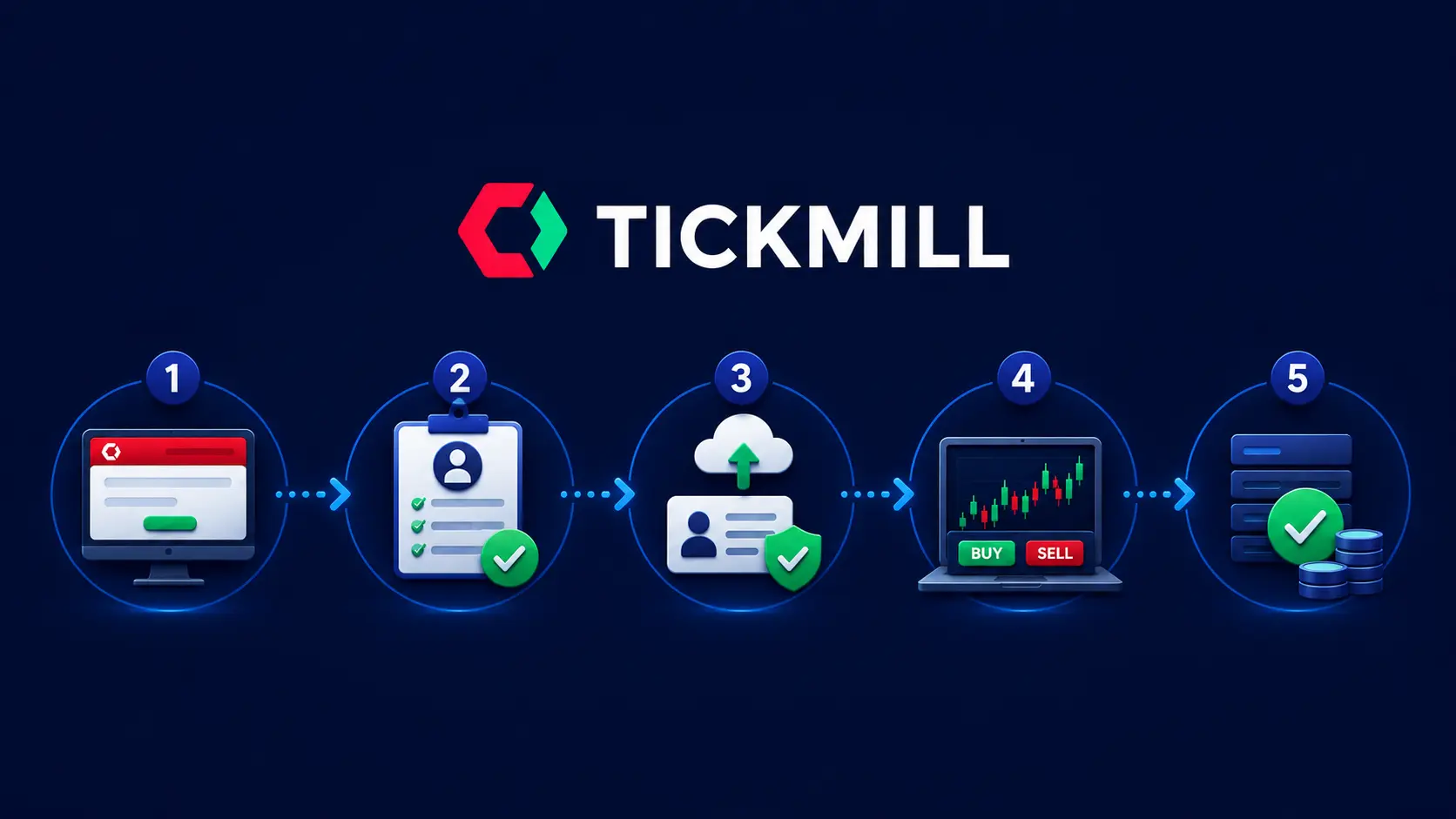
📘 How Long Does It Take to Open a Tickmill Account? Opening a Tickmill account takes under 15 minutes to register and submit your documents. Identity verification (KYC) is typically completed within 24 hours. Once approved, you can deposit funds immediately and begin trading on the same day. |
Opening an account with Tickmill is one of the more straightforward broker registration processes available to retail traders — there is no complex onboarding, no minimum experience requirements, and the entire process is completed online. This guide walks through every screen you will see, in the exact order you will see it, with screenshots taken directly from the live registration flow.
| 📋 What You Need Before You Start | ⚡ Quick Facts |
✅ Government-issued photo ID (Passport, national ID, or driver’s licence) ✅ Proof of address (Utility bill or bank statement — max 180 days old) ✅ Valid email address ✅ Phone number (with country code) ✅ Minimum $100 to fund your account | ⏱ Registration time: ~10 minutes ⏱ KYC verification: within 24 hours 💰 Minimum deposit: $100 📱 Available: Web, iOS, Android 🌍 Accepted in 180+ countries 🔒 FCA + CySEC regulated 🎓 Free demo account also available |
⚡ Ready to Open Your Tickmill Account Now? Click below — you’ll land directly on the Tickmill registration page via AAFX.IO’s partner link. |
Why Open a Tickmill Account?
Before walking through the steps, here is why Tickmill is worth considering:
| Reason | Detail |
|---|---|
| Tier-1 Regulation | FCA (UK) and CySEC (EU) regulated — client funds fully segregated and protected |
| Lowest All-In Spreads | Raw account: ~0.70 pips all-in on EUR/USD — among the best in retail forex in 2026 |
| No Deposit Fees | Zero broker-side fees on deposits and withdrawals across all payment methods |
| All Strategies Allowed | Scalping, hedging, and Expert Advisors (EAs) all supported on MT4 and MT5 |
| Demo Account Available | Open a free demo account with no documents needed — test the platform before committing capital |
| Fast Withdrawals | Withdrawals processed within 1 business day — minimum $25 |
For a full independent assessment: Tickmill Review 2026 — AAFX.IO
The 5-Stage Tickmill Registration Process
The Tickmill sign-up process is split into exactly 5 stages, shown in the progress bar at the top of every registration screen. Here is what to expect at each stage.
| Stage | What Happens | Time Required |
|---|---|---|
| 1 — Account Type | Choose Individual or Corporate. Choose Classic or Raw account. | 1 minute |
| 2 — Personal Details | Name, date of birth, phone, email, country of residence. | 3–4 minutes |
| 3 — Appropriateness Test | Answer questions about trading experience, income, and financial knowledge. | 3–5 minutes |
| 4 — Documents | Upload your ID and proof of address. Review takes up to 24 hours. | 2–3 minutes to upload |
| 5 — Review & Confirm | Final review of all submitted information before account creation. | 1 minute |
| 1 | Visit Tickmill’s Website and Click “Create Account” Navigate to the official Tickmill website. You will see two buttons in the top-right corner: “Demo Account” (free, no documents) and “Create Account” (live trading). Click “Create Account” to begin the registration process. |
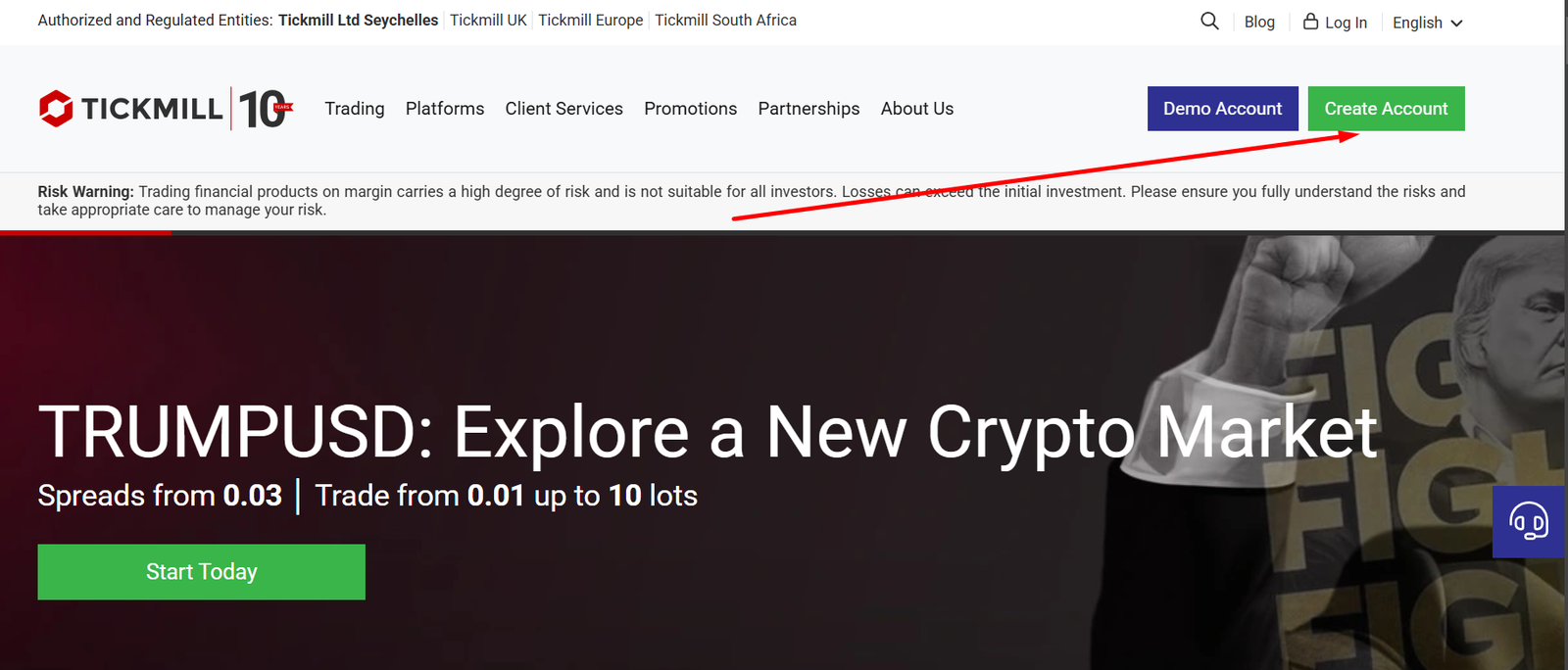
Step 1: The Tickmill homepage — click “Create Account” (green button, top right). Screenshot: Tickmill.com, July 2026.
| 💡 Pro Tip: You can also open a free demo account first by clicking “Demo Account” — no documents or deposit required. The demo uses real market prices with virtual funds and lets you explore the platform and practice trading before going live. |
| 2 | Select Your Account Type The first registration screen asks you to choose between an Individual account (for personal trading) and a Corporate account (for businesses or institutional use). Select “Individual” if you are trading for yourself, then click “Proceed”. |
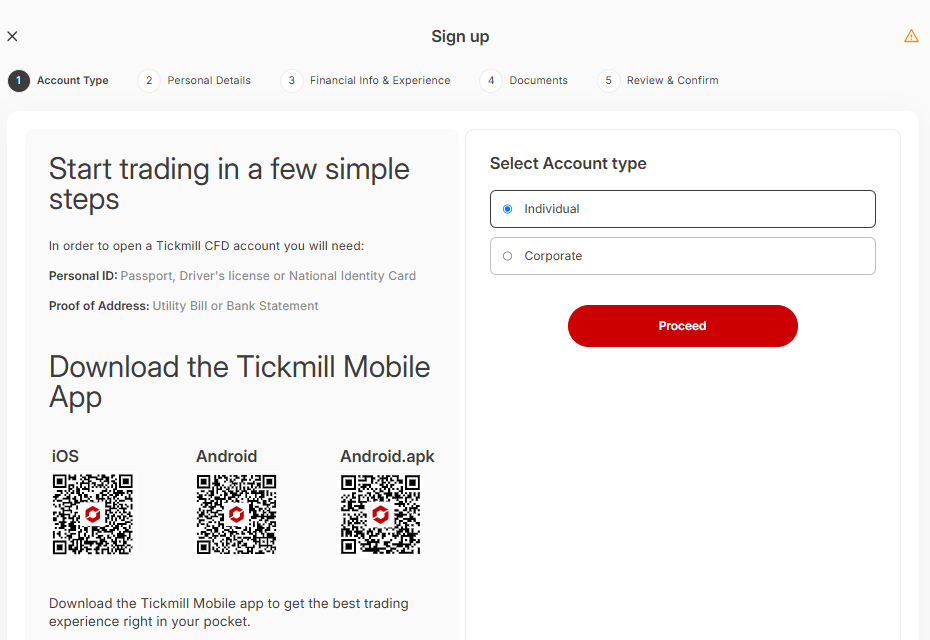
Step 2: Select “Individual” for personal trading, “Corporate” for business accounts. Screenshot: Tickmill registration, 2026.
You will also see QR codes to download the Tickmill Mobile App (iOS, Android, and Android.apk). You can download this now or later — it is not required to complete registration.
| ⚠️ Important: Tickmill does not currently accept registrations from residents of the United States, Singapore, India, or Iran. If your country of residence is on the restricted list, your registration will be declined at a later stage. Check Tickmill’s Terms and Conditions for the current full restricted countries list. |
| 3 | Fill In Your Personal Details Stage 2 of the registration collects your personal information in two sub-steps. First: your full name (title, first name, middle name, last name) and date of birth. Second: your phone number (with country code), email address, and preferred communication language. |
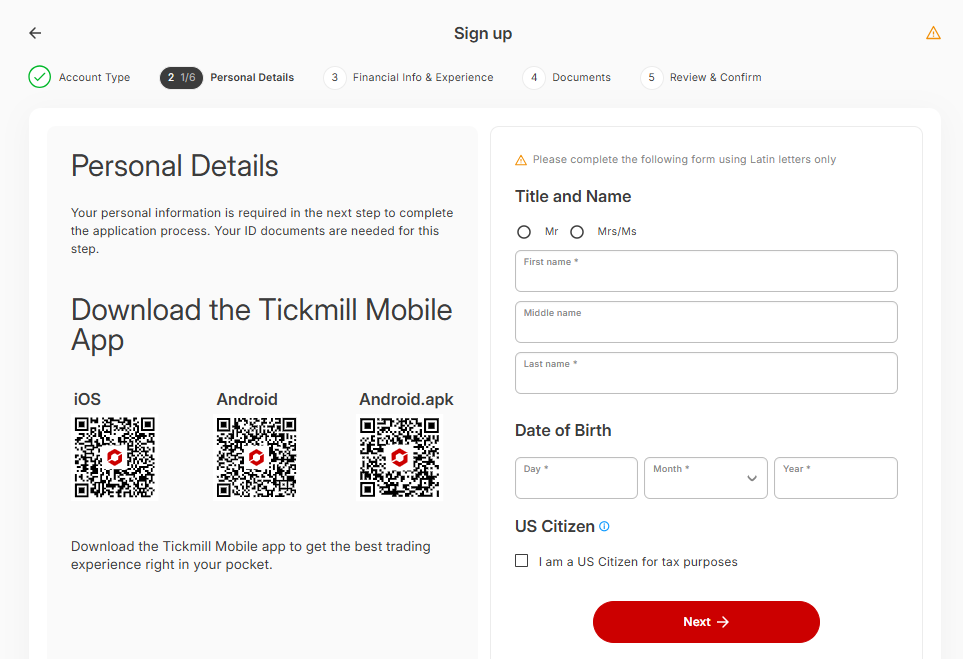
Personal Details (Sub-step 1 of 2): Full name and date of birth. All fields must match your ID documents exactly.
After submitting your name and date of birth, click “Next” to proceed to the contact details sub-step:
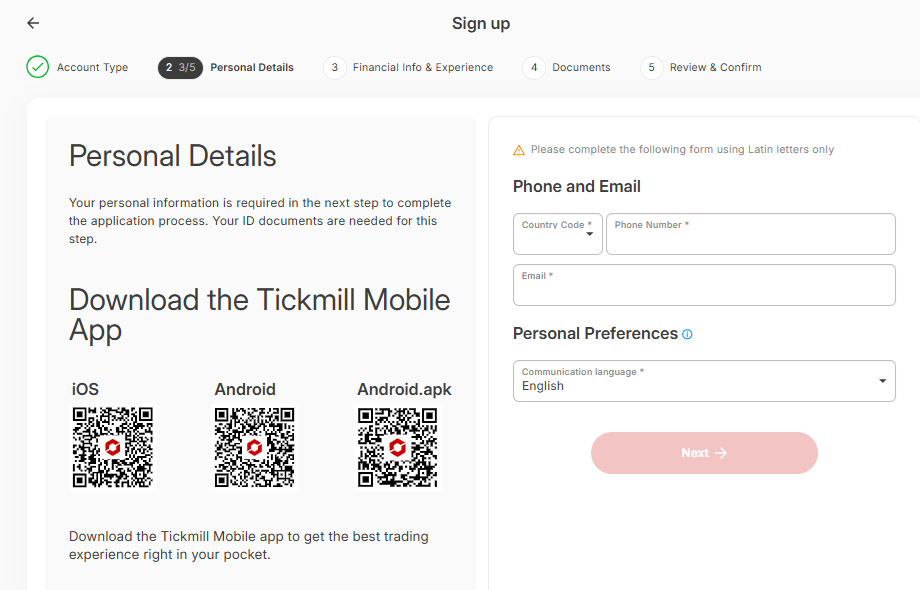
Personal Details (Sub-step 2 of 2): Phone number, email address, and communication language preference.
| Field | What To Enter |
|---|---|
| Title | Mr or Mrs/Ms — select from dropdown |
| First / Middle / Last Name | Use your legal name exactly as it appears on your ID. Latin characters only (no Arabic, Chinese, etc. script — transliterate if needed). |
| Date of Birth | DD/MM/YYYY format. You must be 18 or over to open a live account. |
| Country Code + Phone | Select your country code from the dropdown, then enter your mobile number. This is used for account security and 2FA. |
| Email Address | Use an email you actively check — Tickmill will send your verification link here. You will also receive account notifications at this address. |
| Communication Language | Choose your preferred language for support and communications. |
| 💡 Pro Tip: Your name must match your ID documents exactly. A mismatch — even a middle name included on the ID but not in the registration — is the most common cause of KYC verification delays. Double-check before clicking Next. |
After submitting your contact details, Tickmill will send a verification email to your inbox. Open it and click the confirmation link before continuing. The link is time-limited — if it expires, you can request a new one.
| 4 | Complete the Appropriateness Test As a regulated broker under FCA, CySEC, and FSCA oversight, Tickmill is legally required to assess your trading knowledge and financial situation before granting access to leveraged trading products. This is known as the Appropriateness Test. |
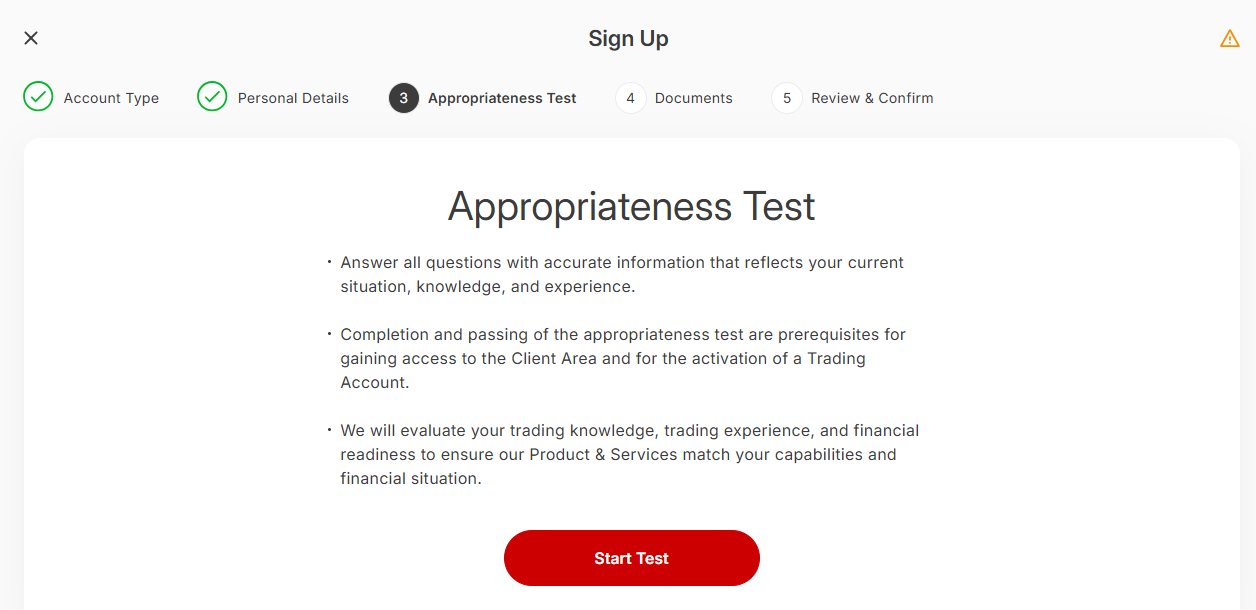
Stage 3: The Appropriateness Test — assesses your trading knowledge, experience, and financial readiness. Screenshot: Tickmill registration, 2026.
What the Appropriateness Test Covers
| Section | Questions Asked |
|---|---|
| Education & Employment | Your highest level of education. Your current employment status and professional background. |
| Financial Background | Annual income and savings. Amount you intend to invest in trading. Your primary trading objective (speculation, hedging, income, etc.). |
| Trading Knowledge & Experience | Have you traded CFDs, forex, stocks, or derivatives before? What was the average size and frequency of your trades? How long did you hold positions? What leverage did you use? |
| Understanding of Risk | Questions testing whether you understand how leverage amplifies losses, what a margin call is, and the risks of trading CFDs. |
| ⚠️ Important: Answer the Appropriateness Test honestly and accurately. Tickmill uses your answers to assess whether leveraged trading products are suitable for your experience level. If you do not pass, Tickmill may offer educational resources or restrict access to certain products. Providing false information violates the Client Agreement. |
The test takes approximately 3–5 minutes to complete. Once done, click “Next” to proceed to document upload.
| 5 | Upload Your Verification Documents (KYC) Tickmill is required by its regulators (FCA, CySEC, FSCA) to verify every client’s identity before allowing deposits or trading. This process is called KYC — Know Your Customer. You must upload two documents: a government-issued ID and a proof of address. |
Document Requirements
| Document Type | Accepted Documents | Requirements |
|---|---|---|
| Identity Verification | Passport, national ID card (front & back), or driver’s licence | Must be valid for at least 3 months from upload date. Must show your full name and date of birth clearly. Must be in colour. All four corners must be visible. |
| Proof of Address | Utility bill, bank statement, or government-issued document showing your address | Must be dated within the last 180 days (6 months). Must show your full name and current residential address. Must be fully legible — no cropping or blurring. |
Accepted file formats: JPG, JPEG, PNG, or PDF. Maximum file size: 4 MB per document. Once both documents are uploaded, click “Submit.”
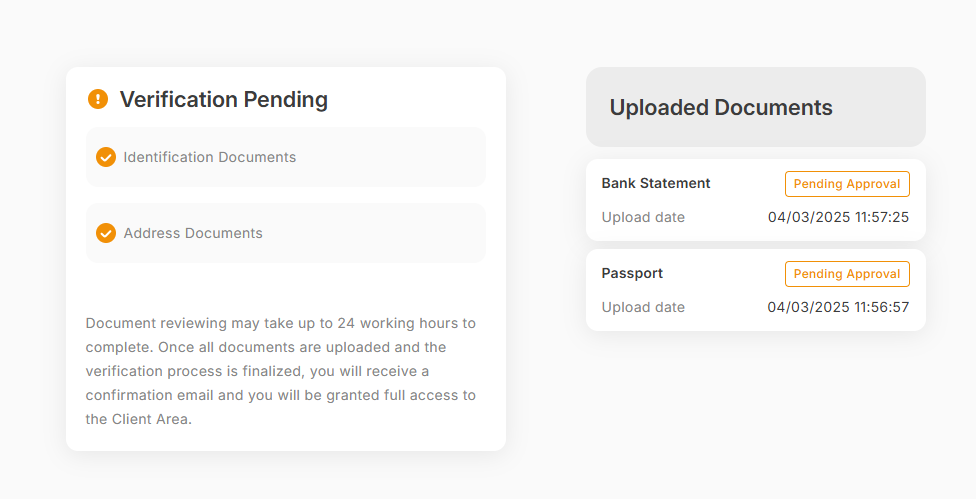
Stage 4: After uploading both documents, the dashboard shows “Verification Pending” with confirmation that both were received. Document review takes up to 24 hours.
Once your documents are submitted, your account shows a “Verification Pending” status. Tickmill’s compliance team reviews each submission and typically completes verification within 24 hours on business days. You will receive a confirmation email once your account is fully approved.
| 💡 Pro Tip: Take your document photos in good natural lighting against a plain background. The most common reasons for KYC rejection are: documents too dark or blurry, edges cropped, or proof of address older than 180 days. Taking a few extra seconds to check your photo before uploading prevents a 24-hour delay. |
| 6 | Fund Your Account and Start Trading After receiving your account approval email, log in to your Tickmill Client Area. Navigate to the “Finance” or “Deposit” section and choose your preferred deposit method. The minimum deposit is $100 across all account types and payment methods. |
| Payment Method | Min Deposit | Processing Time | Fee |
|---|---|---|---|
| Credit/Debit Card (Visa, Mastercard) | $100 | Instant | Zero (Tickmill-side) |
| Bank Wire Transfer | $100 | 1–3 business days | Zero (Tickmill reimburses fees on deposits >$5,000) |
| Skrill / Neteller | $100 | Instant | Zero (Tickmill-side) |
| Crypto (BTC, ETH, USDT, XRP) | $100 | 24/7 Instant | Zero (Tickmill-side) |
| SticPay / FasaPay | $100 | Instant | Zero (Tickmill-side) |
| UnionPay | ¥700 | Instant | Zero (Tickmill-side) |
After your deposit is confirmed, download MT4 or MT5 from the Platforms section in your Client Area — always from Tickmill directly, never from a third-party source. Log in using the server credentials Tickmill emails to you after account activation. Your account is now live and ready to trade.
✅ Open Your Tickmill Account via AAFX.IO FCA & CySEC Regulated · $100 Minimum Deposit · Zero Deposit Fees · All Strategies Allowed |
How to Open a Tickmill Demo Account
📘 Tickmill Demo Account A demo account gives you access to real-time Tickmill market prices with virtual funds — no real money involved. You can test any strategy, practice order types, and explore the MT4/MT5 or Tickmill Trader platforms without any financial risk. |
If you are not ready to deposit real funds yet, a Tickmill demo account is the ideal starting point. The demo requires no documents and can be opened in under 2 minutes:
Go to the Tickmill website and click “Demo Account” (the dark blue button, top right — visible in the homepage screenshot above).
Enter your name, email address, phone number, and select your preferred platform (MT4 or MT5).
Choose your demo account currency and starting virtual balance (typically $10,000 or $100,000 virtual).
Click “Create Account.” You will receive your demo login credentials via email immediately.
Download MT4 or MT5, enter your demo server details, and you are ready to trade with virtual funds.
| 💡 Pro Tip: Tickmill demo accounts do not expire automatically. You can keep using a demo account indefinitely. Use it to test at least 20–30 trades before switching to a live account — this gives you a realistic sense of how your strategy performs before real money is at risk. |
Classic Account vs Raw Account: Which Should You Choose?
This is the most common question from new Tickmill traders. Here is a clear, practical comparison:
| Classic Account | Raw Account | |
|---|---|---|
| Spreads From | 1.6 pips (avg 1.70 pips EUR/USD) | 0.0 pips (avg 0.10 pips EUR/USD) |
| Commission | None | $3 per lot per side ($6 round-turn on FX & metals) |
| All-In EUR/USD Cost | ~1.70 pips | ~0.70 pips ✅ best value |
| Minimum Deposit | $100 | $100 |
| Best For | Beginners, casual traders, those preferring simplicity | Active traders, scalpers, EA traders, anyone who trades 5+ lots/week |
| Platforms | MT4, MT5, Tickmill Trader | MT4, MT5 |
| Islamic Option | ✅ Available | ✅ Available |
| Choose if… | You trade infrequently and want no commissions to track | You trade regularly and want the lowest possible total cost |
| ⚠️ Important: Many beginners default to the Classic account because “no commission” sounds cheaper. For any trader placing more than 3–4 standard lots per month, the Raw account is almost always cheaper in total cost. Run the maths for your own trading volume before choosing. |
Frequently Asked Questions
Q: How long does it take to open a Tickmill account?
Filling in the registration form takes approximately 10 minutes. Uploading your KYC documents takes an additional 2–3 minutes. Identity verification by Tickmill’s compliance team is typically completed within 24 hours on business days. Once verified, you can deposit funds immediately and begin trading on the same day.
Q: What documents do I need to open a Tickmill account?
You need two documents: (1) A government-issued photo ID — passport, national identity card (front and back), or driver’s licence. It must be valid for at least 3 more months and clearly show your full name and date of birth. (2) A proof of address — utility bill, bank statement, or official government letter dated within the last 180 days, clearly showing your full name and current residential address. Both documents must be in colour and fully legible.
Q: What is the minimum deposit to open a Tickmill live account?
The minimum deposit is $100 across all Tickmill live account types — Classic, Raw, and Tickmill Trader Raw. This applies regardless of your chosen payment method. Tickmill does not charge any broker-side fees on deposits. A demo account is available with no deposit required.
Q: Can I open a Tickmill account in any country?
Tickmill accepts traders from 180+ countries. However, registrations are not accepted from residents of the United States, Singapore, India, Iran, and certain other restricted jurisdictions. If you are unsure whether your country is eligible, check Tickmill’s Terms and Conditions or contact their support before starting the registration process.
Q: What is the Tickmill Appropriateness Test and what if I fail it?
The Appropriateness Test is a regulatory requirement under FCA, CySEC, and FSCA oversight. It assesses whether leveraged CFD and forex trading products are appropriate for your experience level and financial situation. If Tickmill determines that the products may not be suitable for you based on your answers, they may restrict access to certain leveraged products or suggest educational resources before proceeding. Always answer honestly — misrepresentation violates the Client Agreement.
Q: Can I open a Tickmill demo account without documents?
Yes. A Tickmill demo account requires only your name, email address, and phone number — no ID documents, no deposit, no KYC verification. You will receive login credentials immediately via email. Demo accounts have no expiry and can be used indefinitely to practice trading strategies in real-time market conditions with virtual funds.
Q: How do I choose between the Classic and Raw account?
For new or occasional traders: start with the Classic account (no commission, straightforward cost structure). For active traders placing 5+ lots per month: choose the Raw account. The Raw account’s all-in EUR/USD cost of ~0.70 pips versus the Classic’s ~1.70 pips means you save approximately $10 per standard lot round-trip. At meaningful volumes, this saving significantly outweighs the per-lot commission.
Q: Is Tickmill a safe broker to deposit money with?
Yes, Tickmill is considered a safe broker by industry standards. It is regulated by the FCA (UK, licence 717270) and CySEC (EU, licence 278/15) — both Tier-1 regulators. Client funds are held in segregated accounts separate from Tickmill’s operational capital. UK-regulated clients are protected by the FSCS up to £120,000 per eligible person. EU-regulated clients are protected by the ICF. Negative balance protection prevents your account from going below zero.
What to Do After Opening Your Account
Once your Tickmill account is verified and funded, here is the recommended sequence for getting started as a new trader:
Download MT4 or MT5 from the Platforms section in your Tickmill Client Area — not from third-party sites.
Log in with your server credentials (emailed to you on activation) and explore the platform in demo mode first if available.
Familiarise yourself with the order types available: market orders for instant execution, limit orders for precise entry prices, and stop loss orders to manage risk on every trade.
Set up your risk management rules before placing your first trade — decide your maximum risk per trade (1% of account is the standard recommendation) and always use a stop loss.
Consider following AAFX.IO’s free daily forex and crypto signals to see real trade setups with defined entries, stop losses, and take profit levels — a useful learning tool for new account holders.
Useful next reads: Full Tickmill Review 2026 — AAFX.IO | Forex Risk Management Guide | Free Daily Trading Signals | Best Forex Brokers 2026
🚀 Open Your Tickmill Account in Under 15 Minutes FCA & CySEC Regulated · $100 Minimum Deposit · Zero Deposit Fees · Raw Spreads from 0.0 Pips |
Affiliate disclosure: AAFX.IO may earn a commission when you open a Tickmill account through eligible links on this page. This does not affect the accuracy or objectivity of this guide. CFD and forex trading involves significant risk of loss. Only trade with capital you can afford to lose.
Sources & Methodology
Primary-source standard: Market-moving facts should link to original data releases, regulator notices, company filings or official project announcements whenever available. Secondary reporting is used for additional context, not as a substitute for original evidence.
Page last reviewed: